
Introduction
Running a digital product business can feel hard sometimes. There are so many tasks to manage—sending emails, helping customers, posting content, tracking payments, and more. Doing everything by hand takes a lot of time. That is why many creators look for simple tools that can help them work faster and stay organized.
This is where n8n workflow templates come in. These templates help you automate tasks so you can save time and focus on growing your digital products. With n8n, you can create smart workflows that run in the background and do the work for you.
In this post, you will learn what n8n workflow templates are, why they matter, and how you can use seven helpful templates to boost your productivity. You will also learn how to set up your first workflow and follow best practices so your automations run smoothly.
Table of Contents
What Are n8n Workflow Templates?
n8n workflow templates are ready-made automation flows you can use to connect apps and tasks. n8n is an automation tool that helps creators link different actions together. For example, you can connect your form app to your email tool, or your payment tool to your Google Sheets.
These templates matter because they make automation easy, especially for creators and digital product sellers. Instead of building everything from scratch, you can pick a template and adjust it to fit your needs.
Some benefits of using n8n workflow templates include:
- They save time for busy creators.
- They help beginners start fast without learning complex tech.
- They make your digital product business run more smoothly.
- They reduce manual work and errors.
If you sell digital products, these templates can help you grow faster with less stress.
Why Automating Digital Product Tasks Matters
Running a digital product business means doing many small tasks each day. You need to:
- Send emails to new buyers
- Deliver digital downloads
- Post content
- Track payments
- Answer support questions
- Collect reviews
Doing all this by hand can feel slow and tiring. It can also lead to mistakes when things get busy.
Automation helps fix these problems. When you use tools like n8n workflow templates, you can reduce errors, save time, and work with more confidence. Automations help your business run even when you are asleep or busy with other things.
These templates also help solve common bottlenecks like slow product delivery, missed emails, or late follow-ups. With automations, everything happens instantly, which makes customers happier and helps you look more professional.
7 Smart n8n Workflow Templates for Digital Product Creators
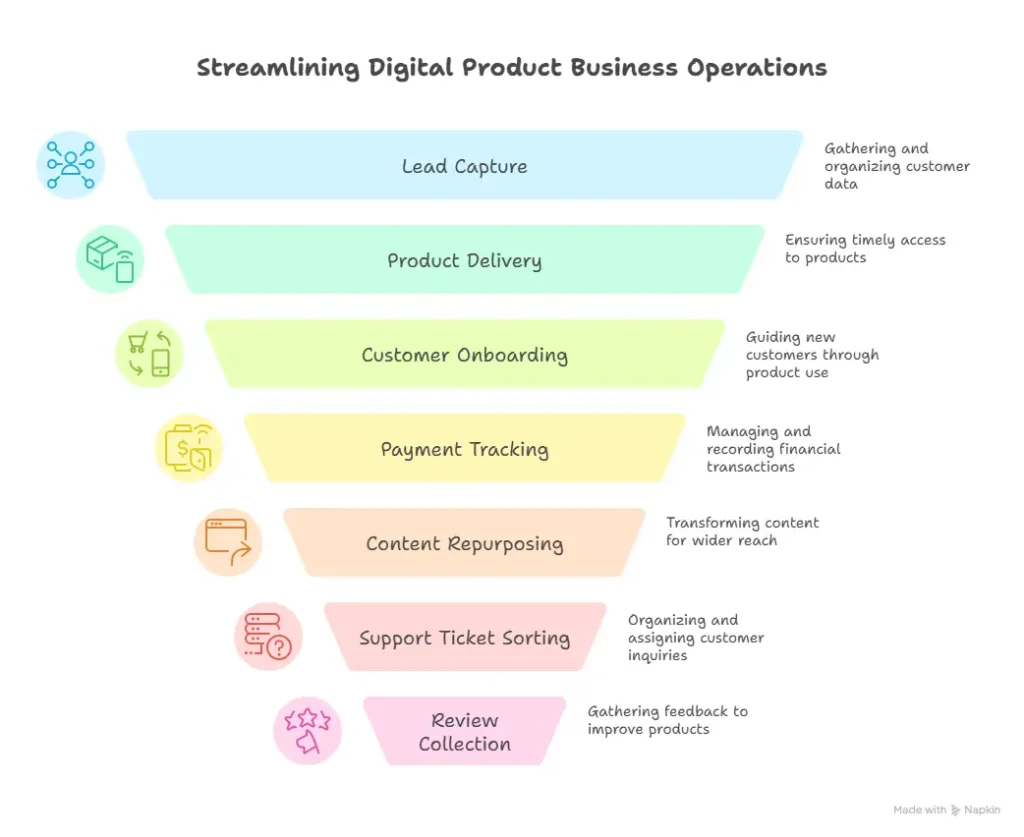
1. Automated Lead Capture and Tagging
Collecting leads is important for any digital product business. With this template, you can gather leads from forms, emails, or social media and organize them automatically.
For example, if someone signs up on your landing page, n8n can:
- Add their email to your list
- Tag them based on what they clicked
- Send them a welcome message
This keeps your funnel clean and saves you hours every week.
2. Instant Digital Product Delivery
Your buyers expect fast delivery. When someone buys your digital product, this workflow sends them the download link or access email instantly.
Some benefits include:
- Your customers receive products right away
- You get fewer support emails asking for access
- You look reliable and professional
This template makes sure every purchase leads to a smooth experience.
3. Customer Onboarding Sequence
New customers may feel lost after buying a digital product. With an onboarding sequence, you can guide them with emails, tips, or tutorials.
This workflow helps you:
- Send a welcome email
- Share training videos
- Explain how to use the product
- Encourage next steps
Good onboarding makes customers happy and boosts retention.
4. Payment and Subscription Tracking
Keeping track of payments by hand can be stressful. This template helps you sync transactions with Google Sheets, your CRM, or any tool you use.
You can automatically:
- Record new sales
- Update subscription renewals
- Flag failed payments
This reduces mistakes and keeps your records clean.
5. Content Repurposing Workflow
Content takes time to create, so repurposing it is smart. With this workflow, you can turn blog posts or videos into social media content.
For example, the workflow can:
- Pull your latest post
- Break it into short tips
- Send those tips to your social media scheduler
This helps you stay active online without doing more work.
6. Automated Support Ticket Sorting
If you get many customer questions, this template helps keep everything organized.
The workflow can:
- Sort questions into categories
- Send them to the right tool
- Assign them to the right team member
This keeps your support system fast and smooth, even when things get busy.
7. Review and Feedback Collection
Reviews help build trust. But asking for reviews manually takes time. This workflow sends an automatic review request to your buyer after a set number of days.
This helps you:
- Build social proof
- Collect more positive reviews
- Improve your digital products based on real feedback
It’s simple but very powerful.
How to Set Up Your First n8n Workflow Template
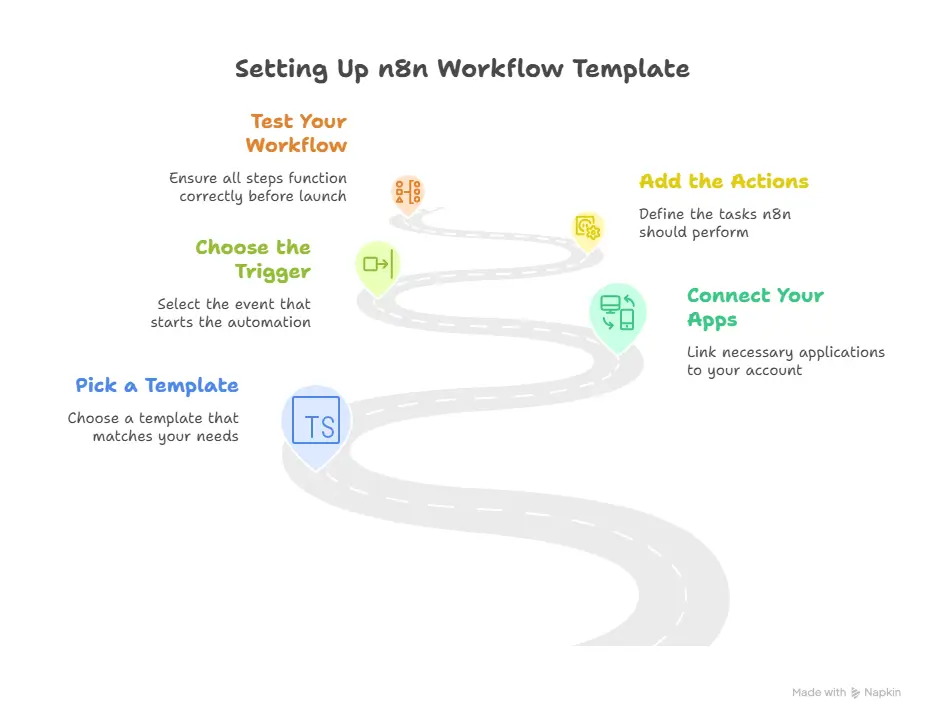
Setting up n8n workflow templates is easier than you think. Here is a quick overview to help you get started:
Step 1: Pick a Template
Start with a template that matches your main need. For example, if you want faster delivery, choose the Instant Product Delivery template.
Step 2: Connect Your Apps
n8n lets you connect tools like Gmail, Stripe, Notion, Shopify, PayPal, and more. Make sure each app is linked to your account.
Step 3: Choose the Trigger
A trigger starts the automation. Examples include:
- A new purchase
- A new form submission
- A new email
Pick the trigger that makes your automation start at the right time.
Step 4: Add the Actions
Actions are what you want n8n to do. For example:
- Send email
- Add contact to list
- Post to social media
Step 5: Test Your Workflow
Always test before going live. Make sure every step works correctly.
Common Mistakes to Avoid
- Adding too many steps at once
- Forgetting to test
- Not naming your workflow clearly
- Not checking app permissions
Start simple and improve as you go.
Best Practices to Maximize Your Automations
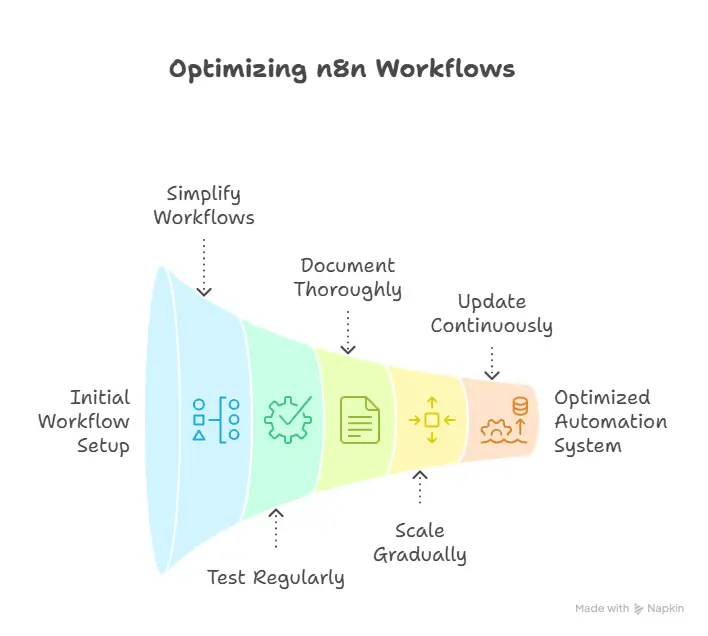
To get the most from your n8n workflow templates, follow these tips:
Keep Workflows Simple
Simple workflows are easier to fix, understand, and update.
Test Often
Testing helps you catch problems early and avoid mistakes.
Document Your Automations
Write down what each workflow does. This helps you remember and improves your system.
Scale Slowly
Start with one workflow, then add more as you grow. Don’t try to automate everything in one day.
Update Your Templates
As your business grows, update your workflows to match new needs.
Final Thoughts
Using n8n workflow templates is one of the best ways to grow your digital product business with less stress. Automations help you save time, reduce errors, and give your customers a better experience.
Start small. Pick one workflow to automate today—maybe delivery, content, or lead tracking. Once you see how much time you save, you’ll want to automate even more.
If you are ready to boost your productivity and grow your business faster, explore more n8n workflow templates and try them for yourself. The sooner you start, the easier your digital product business becomes.
Ready to level up your workflow? Start automating today!
FAQ’s
1. What are n8n workflow templates?
n8n workflow templates are ready-made automation setups that help you connect apps and automate tasks without coding.
2. Do I need technical skills to use n8n workflow templates?
No. Most templates are beginner-friendly, and you can customize them with simple drag-and-drop steps.
3. Can n8n help automate my digital product business?
Yes. You can automate delivery, emails, payments, support, and marketing tasks to save time and avoid manual work.
4. Are n8n workflow templates free to use?
Many templates are free, and n8n itself has a free self-hosted version. Some advanced features may require a paid plan.
5. What apps can I connect with n8n?
You can connect hundreds of apps like Stripe, PayPal, Google Sheets, Notion, Gmail, WordPress, and more.
6. How do n8n automations save time?
They run tasks automatically in the background—no manual emailing, tagging, tracking, or posting.
7. Can n8n send digital products automatically after purchase?
Yes. You can build or use a template that triggers instant product delivery when someone buys from your store.
8. What if a workflow breaks or fails?
n8n shows detailed error logs so you can fix issues quickly. Testing your workflows before going live helps prevent problems.
9. Can I customize a workflow template?
Absolutely. You can add steps, delete steps, or change triggers based on your needs.
10. Is n8n good for beginners selling digital products?
Yes. It’s one of the easiest automation tools for creators, helping beginners save time and grow their digital product business faster.
11. How do n8n workflow templates help with digital product delivery?
n8n workflow templates can send files, emails, or access links instantly after purchase, making delivery faster and more reliable for customers.
12. Are n8n workflow templates safe for handling payments and customer data?
Yes. n8n follows strong security practices, and you can host it yourself for full control over customer data and digital product transactions.
13. Can n8n workflow templates improve customer experience?
Absolutely. Automated onboarding, quick replies, and organized support tickets help you deliver a smoother experience for every buyer.
14. How many workflows can I build with n8n?
There is no limit. You can build unlimited automations to handle marketing, sales, delivery, support, and content tasks for your digital products.
15. Do n8n workflow templates work for beginners selling their first digital product?
Yes. The templates make it easy to set up tasks like email delivery, tagging, payment tracking, and review collection without coding.
16. Can I automate my social media content using n8n workflow templates?
Yes. You can repurpose blog posts, videos, or updates and auto-post them to platforms like Facebook, Instagram, and Pinterest.
17. How do I choose the right n8n workflow template for my business?
Start by listing tasks you repeat daily—such as sending emails, tracking sales, or updating spreadsheets—and choose templates that automate those steps.
18. Do n8n workflow templates work with WordPress websites?
Yes. You can automate WordPress tasks like form submissions, new customer notifications, and content posting using the WordPress node.
19. Can n8n workflow templates help me scale my digital product business?
Definitely. Automation reduces manual work, allowing you to focus on creating new digital products and growing your income.
20. What is the easiest n8n workflow template to start with?
Most beginners start with lead capture or digital product delivery templates because they’re simple, useful, and instantly improve workflow efficiency.
This article explains how N8n ฟรี works for workflow automation and open source automation making it easier to understand self hosting and visual workflow editor usage
Exactly
Useful content for anyone interested in N8n ฟรี
and no code tools for task automation data synchronization and integration platform development
Thank you
Now more
more of what
This is exactly what I was looking for. Also worth checking out Nano Banana.
Your blog is a constant source of wisdom and positivity Thank you for being a ray of light in a sometimes dark world
That’s incredibly kind of you to say—truly means a lot. I just try to share what helps me get through the noise, and knowing it lands with you makes it all worth it. Keep showing up, keep creating, and don’t forget to give yourself credit for the wins along the way. Thank you for being here. 🙏✨
Thank you—that truly means more than you know. 🙏
Some days it feels like we’re all just figuring it out as we go, so knowing that something I shared brought a little light or clarity to your world makes it all worth it.
Keep creating, keep showing up, and don’t forget—you’re a light in someone else’s world too. ✨
Your explanations are always so clear and concise. https://traderzo.com/cryptocurrency-trading-complete-guide-for-new-and-experienced-traders/
Thank you
I just wanted to take a moment to express my gratitude for the great content you consistently produce. It’s informative, interesting, and always keeps me coming back for more!
Thank you so much—that truly means a lot. 🙏
Knowing that the content is informative, interesting, and worth coming back to is the best feedback I could ask for. It’s readers like you who make this space what it is—so thank you for being here, for engaging, and for taking the time to say that.
I’ll keep showing up with value, insight, and maybe a few surprises along the way. Here’s to more great content ahead! 🚀✨
I love how this blog celebrates diversity and inclusivity It’s a reminder that we are all unique and should embrace our differences
Thank you—that truly means a lot. 🙏
I believe the best spaces are the ones where everyone feels seen, respected, and welcome to show up as they are. Celebrating diversity and inclusivity isn’t just a nice idea—it’s what makes a community stronger, richer, and more creative.
We’re all unique, and that’s not something to overcome—it’s something to embrace. Knowing that comes through in the writing means the world.
Thank you for being part of this space. Let’s keep celebrating what makes each of us different. 💛✨
The practical value here is recognizing that automation is not only about saving a few minutes on individual tasks. When email, customer support, content publishing, and payment tracking are handled as separate manual chores, the handoffs between them can become the real source of missed work. A well-defined workflow can make those recurring steps more visible and easier to review. The templates also give people a useful starting point for deciding which repetitive process deserves attention first.