

Social media rewards consistency. You already know that. What’s harder is actually staying consistent when you’re running a business, managing clients, or building a brand.
One day you’re motivated and post three times. The next week goes by and you publish nothing. Then you sit down to create content again and the same question pops into your head:
If that sounds familiar, you’re not alone. Many entrepreneurs and creators struggle with the same problem: content planning takes too much time and mental energy.
The good news? You don’t need to keep doing things the hard way.
Artificial intelligence—especially tools like ChatGPT—has changed how smart creators plan their content. Instead of spending hours brainstorming ideas and drafting posts, you can now generate an entire month of content in a single session.
In this guide, you’ll discover how to use AI to simplify your workflow, organize your social media calendar, and remove the stress from content creation.
By the end of this article, you’ll understand how the system works—and how a simple framework can help you turn ChatGPT into your personal content planning assistant.
Table of Contents
Why AI-Powered Content Planning Feels So Difficult
Before you can fix the problem, you need to understand why it happens.
Most people approach social media backwards. They open Instagram, LinkedIn, or Pinterest and try to come up with a post idea on the spot.
That approach creates three major problems.
1. You rely on inspiration instead of a system
When inspiration is your strategy, consistency becomes almost impossible. Some days ideas flow easily. Other days you stare at a blank screen.
2. You spend too much time thinking
Content planning involves multiple steps:
- Brainstorming ideas
- Writing captions
- Choosing topics
- Organizing posting schedules
- Thinking about engagement
Trying to do all of this every time you post quickly becomes overwhelming.
3. Your content lacks direction
Without clear goals, content becomes random. You post when you remember and talk about whatever comes to mind.
Random content rarely builds a strong audience.
That’s where AI changes everything.
How AI Is Transforming Content Planning
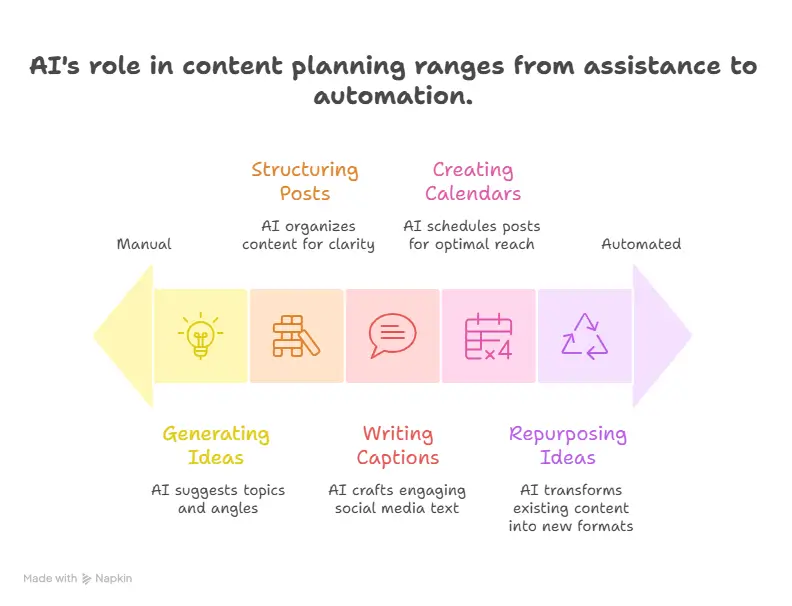
AI tools are powerful because they reduce the mental load of content creation.
Instead of doing everything manually, you can let AI assist you with:
- Generating content ideas
- Structuring posts
- Writing captions
- Creating content calendars
- Repurposing existing ideas
Think of ChatGPT as a thinking partner rather than a replacement for your creativity.
When you combine your expertise with AI’s ability to generate ideas quickly, content planning becomes dramatically easier.
But there’s an important detail many people overlook.
AI only works well when you use the right framework.
Without a structure, AI outputs become generic. With a structured workflow, AI becomes a powerful productivity tool.
That’s exactly what the AI-powered content planning system teaches you.
Step 1: Start With Clear Content Goals
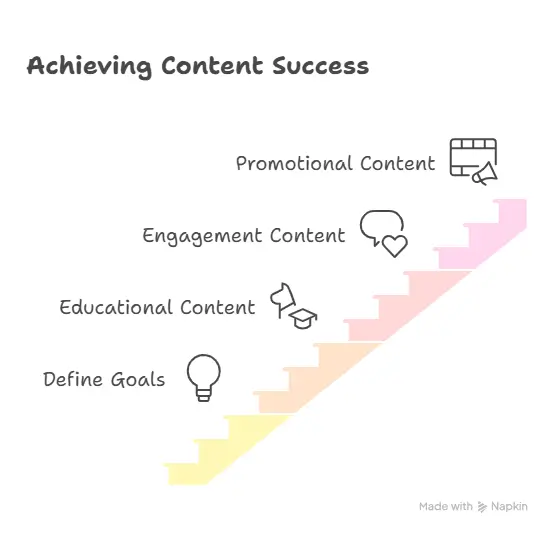
Before generating a single post idea, you need to define the purpose of your content.
Ask yourself a simple question:
What do you want your audience to do after seeing your content?
Your answer will determine your strategy.
Most successful content falls into three categories.
Educational Content
You teach your audience something useful. Educational posts build authority and trust.
Examples include:
- Tips
- Tutorials
- Guides
- Industry insights
Engagement Content
These posts encourage interaction. Engagement helps expand your reach and strengthen your relationship with followers.
Examples include:
- Questions
- Polls
- Discussions
- Stories
Promotional Content
This type of content highlights your products, services, or offers.
Examples include:
- Product announcements
- Client success stories
- Case studies
- Launch promotions
A balanced strategy typically combines all three.
Once you define your goals, ChatGPT can generate ideas that support them.
Step 2: Choose Core Content Themes
Posting random topics confuses your audience.
Instead, organize your content around core themes.
Content themes are recurring topics that reflect your expertise.
For example, if you run an online business, your themes might include:
- Marketing strategy
- Productivity
- Entrepreneurship
- AI tools
- Social media growth
Choosing 4–5 themes helps you stay focused while still providing variety.
Once your themes are defined, ChatGPT can generate dozens of ideas within each topic.
This approach eliminates the most frustrating part of content creation: thinking of what to talk about.
Step 3: Use ChatGPT to Generate Content Ideas
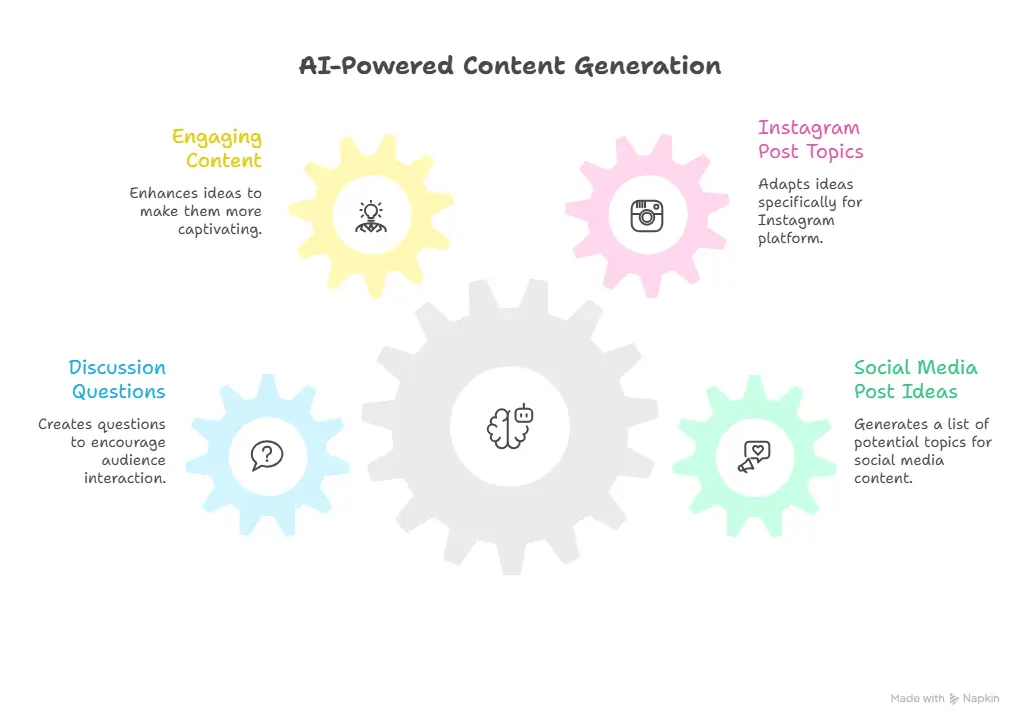
Now comes the part where AI saves you time.
Instead of manually brainstorming ideas, you can prompt ChatGPT to generate them.
For example, you might ask:
“Give me 30 social media post ideas about social media marketing for entrepreneurs.”
Within seconds, you’ll have a full list of potential topics.
You can then refine the ideas by asking follow-up prompts such as:
- “Turn these ideas into Instagram post topics.”
- “Make these ideas more engaging.”
- “Suggest discussion questions for these topics.”
Suddenly, your content pipeline is full.
No more blank page. No more guesswork.
Just a steady stream of ideas ready to develop into posts.
Step 4: Turn Ideas Into Complete Posts
Ideas are helpful, but you still need to turn them into publishable content.
This is another area where ChatGPT can assist.
Instead of writing from scratch, you can ask AI to draft captions based on your topics.
For example:
“Write a LinkedIn post about why entrepreneurs struggle with content consistency.”
You can then edit the draft, add your personal experience, and adjust the tone.
This process cuts your writing time dramatically while still allowing your voice to shine through.
Over time, you’ll develop prompts that produce content closer to your style.
Step 5: Organize Your Social Media Calendar
Once you have your ideas and drafts, the next step is organization.
A content calendar helps you plan posts ahead of time.
Instead of deciding what to publish each day, you map out your content in advance.
Your calendar might look like this:
Monday – Educational tip
Wednesday – Engagement post
Friday – Promotional content
This rhythm creates consistency without overwhelming your audience.
You can store your calendar in simple tools like:
- Google Sheets
- Notion
- Trello
- Content planning apps
The tool doesn’t matter as much as the system.
What matters is that your ideas are organized and scheduled.
Step 6: Batch Your Content Creation
One of the most effective productivity techniques is batching.
Instead of creating content every day, you dedicate a single session to producing multiple posts.
For example, you might:
- Generate 30 ideas in 10 minutes
- Draft 10 posts in 30 minutes
- Schedule them in 20 minutes
In less than an hour, your entire month of content could be ready.
This approach removes the daily stress of posting and frees up your time for more important tasks.
Step 7: Stay Consistent Without Burnout
Consistency is the secret ingredient behind social media growth.
But consistency doesn’t mean posting constantly.
It means showing up regularly with valuable content.
When you use AI to streamline your planning process, consistency becomes much easier.
You’re no longer scrambling for ideas.
Instead, you’re following a clear system that supports your goals.
Why Most People Still Struggle With AI Content
Despite the power of AI tools, many creators still struggle to use them effectively.
The problem isn’t the technology.
It’s the lack of structure.
Without a clear process, people rely on random prompts and hope for good results.
That approach rarely works.
A structured framework solves that problem by guiding you through every step:
- defining goals
- choosing themes
- generating ideas
- writing posts
- organizing your calendar
Once you follow the framework, AI becomes incredibly useful.
The Shortcut: A Complete AI Content Planning System
If you want to implement this strategy quickly, having a step-by-step guide makes a huge difference.
That’s exactly why the AI-Powered Content Planning ebook was created.
Instead of piecing together random tutorials online, the guide walks you through a clear system for using ChatGPT to plan your social media calendar.
Inside the ebook, you’ll discover:
- A simple framework for planning content
- Proven ChatGPT prompts for generating ideas
- A method for organizing your content calendar
- Strategies for writing engaging posts faster
- Tips for maintaining consistency without burnout
The goal isn’t to overwhelm you with theory.
The goal is to give you a practical workflow you can apply immediately.
Who This Guide Is Perfect For
This system works especially well if you are:
- A solopreneur building an online presence
- A content creator trying to stay consistent
- A coach or consultant attracting clients through content
- A marketer managing social media accounts
If you’ve ever felt stuck wondering what to post, this approach can completely change how you plan content.
Imagine Your Content Process One Month From Now
Picture what your workflow could look like.
Instead of opening social media and feeling stressed about posting, you simply follow your calendar.
Your ideas are already planned.
Your captions are already drafted.
Your schedule is already organized.
Content creation becomes a small task rather than a daily burden.
That’s the real benefit of AI-powered planning.
It gives you back your time and mental energy.
Final Thoughts
Social media content isn’t going away.
If anything, the demand for consistent content is increasing.
But the way you create content can evolve.
You don’t need to spend hours brainstorming ideas every week.
With the right strategy—and the help of AI—you can simplify your workflow and stay consistent without burnout.
If you want to implement this system step-by-step, the AI-Powered Content Planning ebook walks you through the exact process.
Inside, you’ll find the prompts, frameworks, and practical strategies that help you plan your entire social media calendar faster.
Ready to Simplify Your Content Strategy?
If you’re tired of staring at a blank screen wondering what to post, it’s time to change your approach.
The AI-Powered Content Planning ebook shows you how to turn ChatGPT into your personal content planning assistant.
You’ll learn how to:
- generate endless post ideas
- write captions faster
- organize your social media calendar
- stay consistent without stress
Instead of guessing what works, you’ll follow a proven system designed to save time and keep your content strategy organized.
Download the ebook today and start planning smarter.
FAQs
1. What is AI-powered content planning?
AI-powered content planning is the process of using artificial intelligence tools like ChatGPT to brainstorm ideas, write posts, and organize a social media content calendar. Instead of manually generating every idea, AI helps you create and structure content faster while maintaining consistency across your platforms.
2. How can ChatGPT help with social media content planning?
ChatGPT can help you generate content ideas, draft captions, create outlines, suggest hashtags, and even build a full social media calendar. When used with a structured workflow, it significantly reduces the time needed to plan and create posts.
3. Can ChatGPT create a full social media calendar?
Yes. With the right prompts, ChatGPT can generate enough ideas to fill a complete 30-day content calendar. You can then organize those ideas into categories like educational posts, engagement posts, and promotional content.
4. Is AI-generated content good for social media marketing?
AI-generated content can be extremely useful when combined with your personal insights and expertise. AI helps with structure and speed, while your edits ensure the content reflects your voice, brand, and experience.
5. How long does it take to plan content using ChatGPT?
With a clear system, you can plan an entire month of content in less than an hour. AI tools accelerate brainstorming, writing, and organizing posts so you spend less time planning and more time engaging with your audience.
6. Do I need technical skills to use ChatGPT for content planning?
No technical skills are required. ChatGPT works through simple prompts and conversations. Once you understand how to ask the right questions, you can generate ideas and content quickly.
7. What types of content can ChatGPT help create?
ChatGPT can help you create many types of social media content including:
- Educational posts
- Marketing tips
- Thought leadership posts
- Engagement questions
- Storytelling posts
- Promotional captions
It can also help repurpose one idea into multiple formats.
8. What platforms can this content planning method work for?
The system works for nearly every social media platform, including:
- Twitter (X)
- TikTok
You can adapt the same core ideas to fit each platform’s style.
9. How do I stay consistent with social media content?
Consistency becomes easier when you plan content in advance. Using AI to generate ideas and organize them into a calendar removes the pressure of deciding what to post every day.
10. Where can I learn the full AI content planning system?
If you want a complete step-by-step framework, the AI-Powered Content Planning eBook explains how to use ChatGPT to generate ideas, write posts faster, and build a full social media calendar without stress.
The guide includes practical prompts, planning strategies, and a simple workflow designed to help you stay consistent with your content.
11. How do you use ChatGPT to create a social media content calendar?
You can use ChatGPT to create a social media content calendar by asking it to generate post ideas based on your niche, audience, and goals. Once the ideas are generated, organize them into weekly themes such as educational posts, engagement content, and promotional posts. This allows you to plan 30 days of content quickly and maintain a consistent posting schedule.
12. What are the best ChatGPT prompts for content planning?
Effective ChatGPT prompts are clear and specific. For example, you can ask ChatGPT to generate post ideas for your industry, turn those ideas into captions, or suggest questions to drive engagement. Using structured prompts helps you generate better content ideas and speeds up your content planning process.
13. Can ChatGPT help generate content ideas for social media?
Yes, ChatGPT is extremely useful for generating content ideas. By providing your niche, target audience, and platform, you can quickly generate dozens of post ideas. This makes it easier to fill your content calendar and maintain consistency without running out of topics.
14. Is AI content planning better than traditional content planning?
AI content planning is often faster and more efficient than traditional methods because it reduces the time spent brainstorming and organizing ideas. While traditional planning relies heavily on manual research and creativity, AI tools help automate idea generation while still allowing you to refine and personalize the content.
15. What are the benefits of using AI for social media content creation?
Using AI for social media content creation can help you save time, generate new ideas, and maintain consistency in your posting schedule. AI tools like ChatGPT can assist with brainstorming, writing captions, organizing content calendars, and repurposing existing content across different platforms.

One useful way to make an AI-generated content calendar more reliable is to separate the workflow into research, idea scoring, draft creation, approval, and repurposing instead of asking the AI to generate a full month in one pass. That makes it easier to keep posts tied to actual customer questions and to avoid publishing thin variations of the same idea. For small teams, I also like adding a weekly review checkpoint where the owner marks which ideas should become blog posts, newsletters, or social snippets. I publish related workflow guides at AI Flow Harbor, and this content calendar workflow may be a helpful companion for readers turning AI planning into an operating system: https://aiflowharbor.com/blog/ai-content-calendar-workflow/
Great point—breaking the AI workflow into smaller steps with checkpoints is exactly the kind of system thinking that saves time and keeps content relevant. I love the idea of a weekly review to decide which ideas turn into what format. That actually pairs really well with a planner that tracks performance across those different outputs (blog, newsletter, social). Thanks for sharing your guide—definitely a helpful companion for anyone looking to move from random AI prompts to a real content operating system. 🙏
Obrigado! The Choicer Voicer: sem baixar nada. The Choicer Voicer
Great content. Looking forward to reading more from this site. https://traderzo.com/financial-literacy-essential-skills-for-better-money-management/
Thank you