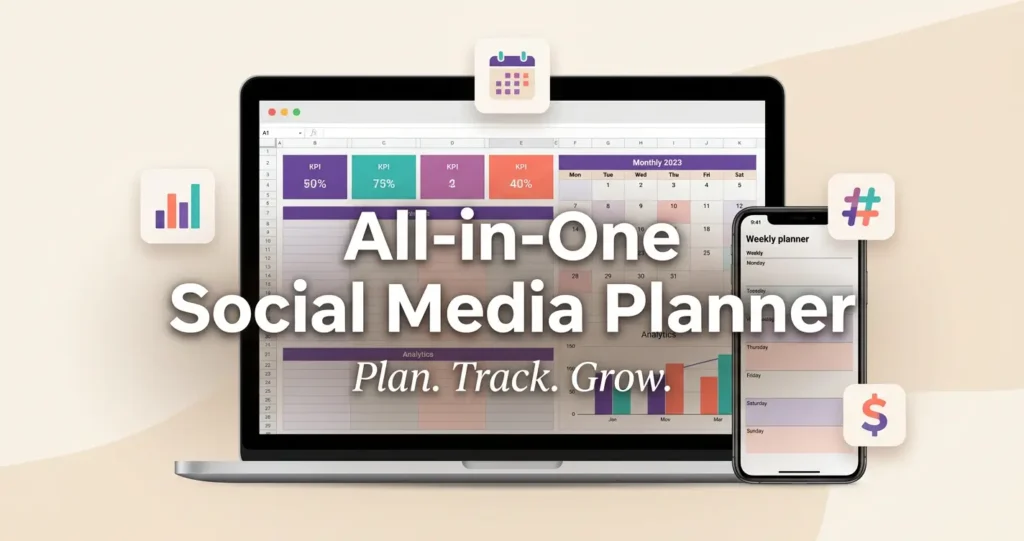
If you want a social media system that helps you stay organized, post consistently, and track real growth, the All-in-One Social Media Planner is built for you. This is not just another content calendar. It is a complete digital planning system designed to help you manage your content, monitor your results, and turn your social media into a more profitable part of your business.
Table of Contents
Why You Need This Planner
Managing social media without a proper system usually leads to chaos. Ideas get lost, posts get delayed, hashtags are repeated without strategy, and performance is hard to measure. The result is wasted time, inconsistent posting, and slow growth.
The All-in-One Social Media Planner solves that problem by giving you one place to plan everything. You can map your brand, organize your content, schedule your posts, track your analytics, and monitor your income all in one workbook. That means less stress for you and more control over your content.
What Makes This Planner Different
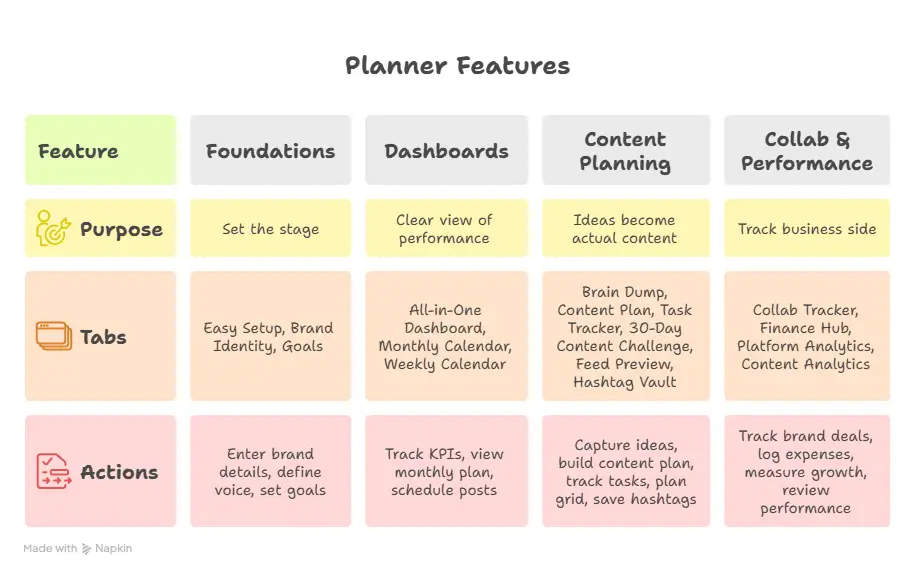
This planner is built as a full operating system for social media, not a simple template. It includes 16 professional tabs organized into four strategic sections: Foundations, Dashboards, Content Planning, and Collab & Performance. Each tab is designed to help you take action faster and make better decisions.
Unlike basic planners, this one supports both content creation and business growth. You are not only planning what to post. You are also tracking what is working, what is earning, and where your efforts should go next.
What’s Included in the Planner
Foundations
The Foundations section helps you set the stage before you start posting. It includes Easy Setup, Brand Identity, and Goals tabs so you can define your brand and set clear targets.
With these tabs, you can:
- Enter your brand details once and use them throughout the planner.
- Define your voice, colors, content pillars, and audience.
- Set follower and engagement goals with progress tracking.
Dashboards
The Dashboards section gives you a clear view of your performance. It includes an All-in-One Dashboard, Monthly Calendar, and Weekly Calendar. These tools help you see your content schedule and growth metrics at a glance.
With the dashboard, you can:
- Track live KPI boxes automatically.
- View your monthly content plan in one place.
- Schedule posts by time using the weekly calendar.
Content Planning
This is where your ideas become actual content. The planner includes Brain Dump, Content Plan, Task Tracker, 30-Day Content Challenge, Feed Preview, and Hashtag Vault. These tabs help you stay creative, consistent, and strategic.
You can:
- Capture 50+ ideas before they disappear.
- Build a 50-post content plan with status and hashtags.
- Track tasks and completion progress.
- Plan your Instagram grid before publishing.
- Save and organize hashtags by performance.
Collab & Performance
This section helps you track the business side of your social media. It includes Collab Tracker, Finance Hub, Platform Analytics, and Content Analytics. If you work with brands, sell digital products, or monetize your content, this section is especially valuable.
You can:
- Track brand deals, gifted posts, and affiliate income.
- Log expenses and calculate net profit.
- Measure growth across multiple platforms.
- Review post-by-post performance and engagement.
Who This Planner Is For
This planner is a great fit if you want a more professional way to manage your social media. It works well for creators, influencers, coaches, freelancers, social media managers, and digital product sellers. It is also useful for small business owners who want a better way to plan content and measure results.
If you are tired of switching between too many apps, this planner can simplify your workflow. It brings your content, goals, analytics, and revenue tracking into one clean system.
Why You’ll Love Using It
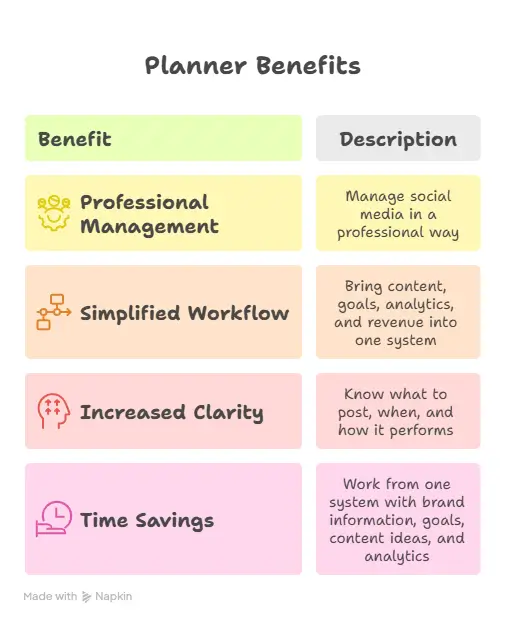
The biggest benefit of this planner is that it helps you work with more clarity. You know what to post, when to post, and how each post performs. That makes it easier for you to stay consistent and improve over time.
It also helps you save time. Instead of rebuilding your strategy every week, you can work from one system that already contains your brand information, goals, content ideas, a
nd analytics. That makes your process smoother and far more efficient.
Get the All-in-One Social Media Planner today and start turning your content into a system that works for you.
How to Use the Planner
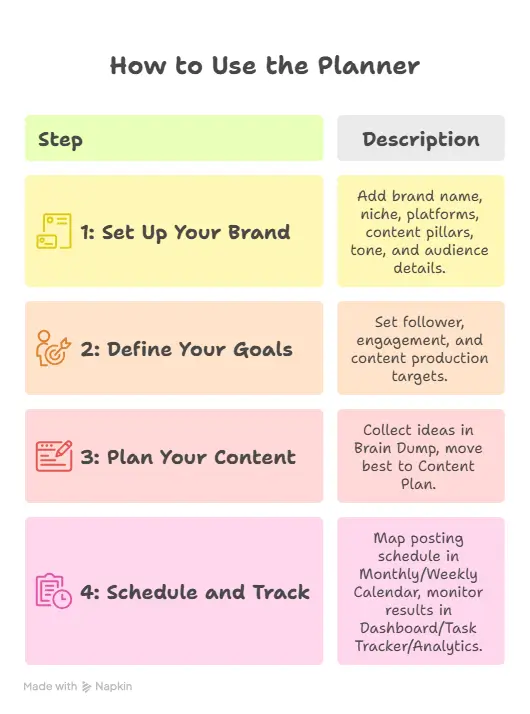
Step 1: Set Up Your Brand
Start with the Easy Setup and Brand Identity tabs. Add your brand name, niche, platforms, content pillars, tone, and audience details. This creates the foundation for everything else.
Step 2: Define Your Goals
Next, use the Goals tab to set follower and engagement targets. You can also track content production goals so you always know what you are aiming for.
Step 3: Plan Your Content
Use the Brain Dump tab to collect ideas, then move the best ones into the Content Plan. This helps you stay prepared and never run out of content ideas.
Step 4: Schedule and Track
Use the Monthly Calendar and Weekly Calendar to map out your posting schedule. Then update the Dashboard, Task Tracker, and Analytics tabs to monitor results and improve your strategy.
Why This Is a Smart Buy
If you want a planner that does more than list post ideas, this is a strong choice. It helps you build a content workflow, measure performance, and track revenue in one place. That makes it a practical tool for anyone serious about growing on social media.
Instead of relying on guesswork, you get structure. Instead of scattered notes, you get one system. Instead of passive planning, you get a tool that supports real growth.
FAQ
What is the All-in-One Social Media Planner?
It is a premium social media planning system with 16 tabs covering brand setup, goals, calendars, content planning, collabs, finance, and analytics.
Is this planner only for Instagram?
No. It supports multiple platforms, including Instagram, TikTok, YouTube, LinkedIn, Twitter/X, Pinterest, and Facebook.
Can I use this planner to track brand deals?
Yes. The Collab Tracker is designed to help you monitor brand deals, gifted posts, affiliate work, and revenue totals.
Does it include analytics?
Yes. It includes both Platform Analytics and Content Analytics so you can track follower growth, engagement, reach, and post performance.
Is this good for beginners?
Yes. The planner includes a step-by-step setup flow, so even if you are just starting, you can follow the structure and build a consistent system.
Final Thoughts
The All-in-One Social Media Planner is a smart choice if you want to get organized, stay consistent, and grow with more confidence. It gives you the structure to plan content, measure progress, and manage social media like a real business. If you are ready to simplify your workflow and take control of your content, this planner is worth it.

Ótimo artigo! O Claude Fable 5 em / tem sido útil em fluxos parecidos. Claude Fable 5
Solid write-up — learned a lot. Worth trying Van Gogh Free AI Video Generator — for free AI video generation.. Van Gogh Free AI Video Generator
Thanks for simplifying something I found confusing. https://traderzo.com/trading-tutorials-learn-technical-and-fundamental-analysis/
Glad you found it useful!
A planner becomes far more useful when it connects consistent publishing with a clear view of what is actually working. Treating it as a broader system, rather than a list of posting dates, can help teams review results, spot gaps in their content mix, and make the next round of planning more deliberate. The profitability angle also keeps measurement tied to business priorities instead of vanity metrics.
You’ve hit the nail on the head. 💯
A planner that *connects consistent publishing with a clear view of what’s working* is no longer just a calendar—it’s a strategic feedback loop. Treating it as a broader system lets you review results, spot content gaps, and plan your next moves with real intention—not just habit.
And tying it all back to profitability keeps measurement honest. It shifts the focus from vanity metrics to what actually moves the business forward.
This is the kind of thinking that turns content into a business asset rather than just a task to check off. Appreciate you sharing it so clearly—this is a perspective more creators need to hear. 🙌
Fantastic social media workflow planner and AI automation strategies. Highly useful guide!
Thank you
A structured social media system is crucial for turning content creation into measurable business growth. To discover and evaluate modern tools that optimize digital planning, HuntAI provides a great directory of resources that complement this workflow.
You’ve nailed the connection—a structured social media system is exactly what turns consistent content creation into measurable business growth.
Having a dedicated system to bridge strategy, scheduling, and asset creation makes a massive difference for creators. When managing multi-platform distribution, maintaining visual consistency is often the biggest bottleneck, so combining this planner structure with quick visual generation tools like PerchanceAI helps keep both the editorial calendar full and the publishing cadence steady.
You’re spot on. A dedicated system that connects strategy, scheduling, and asset creation is a game-changer.
Multi-platform distribution is tough, and visual consistency is often the biggest bottleneck. Pairing a planner with quick visual generation tools (like PerchanceAI) keeps the calendar full and the publishing cadence steady—without the creative burnout.
That’s exactly how you turn a workflow into a winning rhythm. 🙌
A well-designed planner is especially valuable when it combines content scheduling with performance tracking, since that helps turn consistent posting into clearer decisions over time. I also find that keeping ideas, goals, and analytics connected in one workflow makes it much easier to identify what deserves more attention.
You’ve hit on something really important—and it’s the core reason why a connected planner is so much more powerful than a simple content calendar.
This planner provides a very structured framework for organizing social media content calendars and tracking performance. Having visual assets ready for scheduled posts is crucial, and using https://aigazou.art makes generating AI images and video content straightforward.
Thanks for sharing that—and you’re absolutely right. A structured content calendar only works if you can actually execute the visuals to go with it. That’s where a tool like Aigazou fits perfectly into the system.
It’s a great reminder that the best planning systems aren’t just about organization—they’re about making execution faster and easier.
Appreciate you highlighting that connection! 🙌
Having a centralized dashboard makes scheduling batch content so much smoother. When managing high-volume social campaigns, keeping track of different content pillars—even niche gaming tutorials like a Meowdoku Guide—becomes much easier to organize and measure over time.
Really helpful breakdown — I like how you connect consistent publishing with tracking what actually works instead of just filling dates. I’ve been applying a similar batch-and-review routine and even plan short creative breaks around it, like a quick round of Play Smash Fest to reset before reviewing analytics. Makes sticking to the content plan much easier.
I like that the Collab & Performance section goes beyond planning to track affiliate income, expenses, and net profit — most planners stop at the content calendar. Has anyone found that tracking finances alongside content actually changes which posts they prioritize?
Great catch—and yes, it really does change things. 🙌
When finances sit next to the content calendar, you start seeing which posts actually *drive revenue* versus which ones just drive likes. A post that takes 10 minutes and brings in affiliate sales suddenly looks a lot more valuable than the “perfect” one that gets engagement but no clicks.
That shift usually leads to prioritizing:
– Content tied to offers that actually convert
– Formats that consistently drive affiliate clicks
– Posts you can repurpose across launches
So instead of asking “what should I post?”, you start asking “what’s actually paying off?”—and that changes the whole calendar.
Curious what others have noticed too! 💡
I really like how this planner treats social media as a system rather than a list of dates. The part that resonates most is connecting planning to actual results instead of vanity metrics. In practice, the thing that decides whether a plan stays consistent is asset creation: when every post needs a fresh visual, the calendar stalls. Lately I have been generating quick AI images or a short video from a prompt first and then slotting them into the plan, and it removes a lot of that friction. It pairs nicely with the workflow you describe here.
You’ve hit on the part most planners quietly ignore. 🙌
Everyone loves the idea of a content calendar—until it’s Thursday and every post still needs a fresh visual. That’s where consistency goes to die. Not because the plan was bad, but because asset creation became the bottleneck.
Your approach flips the order in a smart way: generate visuals first, slot them into the plan second. Instead of the calendar creating demand you can’t meet, you’re building a small bank of assets and letting the plan organize what already exists. That removes the daily friction that kills momentum.
It’s the same principle behind the planner itself—remove the decision fatigue, keep the system moving. And pairing it with quick AI image/video generation makes the whole loop faster: prompt → asset → schedule → publish → review.
Appreciate you sharing this—it’s a practical insight more creators need to hear. 🙌