
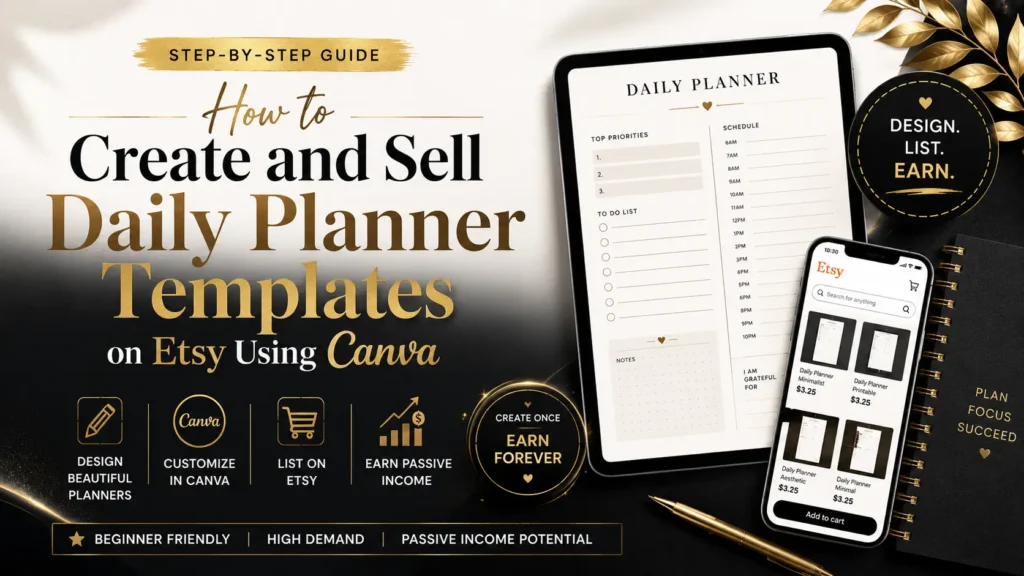
Understanding the Market for Daily Planner Templates on Etsy
If you want to successfully sell daily planner templates on Etsy, you need to first understand the dynamics of this marketplace. Planners have become essential tools in people’s lives, helping them organize, prioritize, and achieve their goals in a hectic world. The market for printable planners and digital organization tools is thriving, propelled by trends toward remote work, digital productivity, and growing interest in self-care and time management.
Table of Contents
Why Daily Planner Templates Are in Demand
Daily planner templates are especially popular because they offer detailed control over time management, helping users schedule hourly tasks, set priorities, and track habits or wellness routines. These templates attract a diverse audience including students managing coursework, professionals optimizing productivity, parents juggling family schedules, and entrepreneurs planning business tasks.
Market Insights on Etsy
Etsy remains one of the best platforms for digital downloads, including daily planner templates. Search trends show high volumes for keywords like “daily planner templates,” “printable daily planner,” and “digital planner PDF.” Seasonal peaks typically occur at the start of school years and the new year when people seek fresh organizational tools.
Understanding what buyers want on Etsy helps you tailor your products. Popular features include:
- Editable templates versus fixed printables
- Aesthetic yet minimalist layouts for readability
- Additional bonus pages like habit trackers or motivational quotes
Key Market Takeaways
- The demand for functional, easy-to-use planner pages is growing.
- Buyers appreciate either ready-to-print PDFs or customizable Canva templates.
- Standout sellers combine creativity with precise SEO optimization and stellar customer service.
Setting Up Your Canva Workspace for Daily Planner Templates
Creating beautiful and usable daily planner templates starts with organizing your Canva workspace effectively. Canva’s intuitive tools make it an ideal platform whether you’re a seasoned designer or just starting out.
Why Choose Canva for Planner Design?
Canva offers a perfect blend of ease and power for creating digital products:
- User-Friendly Interface: Drag-and-drop features make designing simple, even if you have no prior graphic design software experience.
- Template Library: Thousands of customizable templates and design elements allow you to work faster without sacrificing personalization.
- Cost Effective: You can begin with Canva’s free plan and upgrade to Canva Pro for extended features and premium assets if needed.
- Brand Kit: The Pro plan enables you to save your brand colors, fonts, and logos for a consistent look across all your templates.
Essential Canva Features for Daily Planner Templates
To maximize your workflow and design impact, focus on these key Canva tools:
- Magic Resize: This feature lets you quickly adjust your planner template to different sizes (such as A4 or US Letter), saving you hours of manual formatting.
- Grids and Frames: Use grids to organize content neatly and frames to add photos or decorative elements seamlessly.
- Text Styles: Save your preferred fonts and sizes as styles, ensuring consistency and speeding up text addition.
- Color Palette: Stick to a cohesive color scheme by creating a custom palette reflecting your brand or design theme.
- Elements & Stickers: Incorporate icons, checkboxes, lines, shapes, and other graphics to enhance usability and visual appeal.
Recommended Canva Settings for Etsy Templates
Before you dive into designing, set up your files with Etsy buyers in mind:
- Page Dimensions: 8.5” x 11” (US Letter) is a standard size that suits printable planners. A4 is popular among international customers.
- Page Count: If your daily planner is multi-page (day plus notes, trackers), set this up as a multi-page document within Canva.
- File Format for Export:
- Use PDF Print to produce high-resolution, print-ready files Etsy users can download and print at home or professionally.
- Export PNG or JPG formats if you’re offering stickers or digital planner elements intended for digital use.
- Organizing Pages: Label your pages clearly if you’re selling bundles or multi-page planners, so buyers know what they’re getting.
This setup stage is pivotal: a well-organized Canva workspace means less time correcting, easier edits, and professional-looking templates that impress buyers.
Designing Attractive and Functional Daily Planner Templates
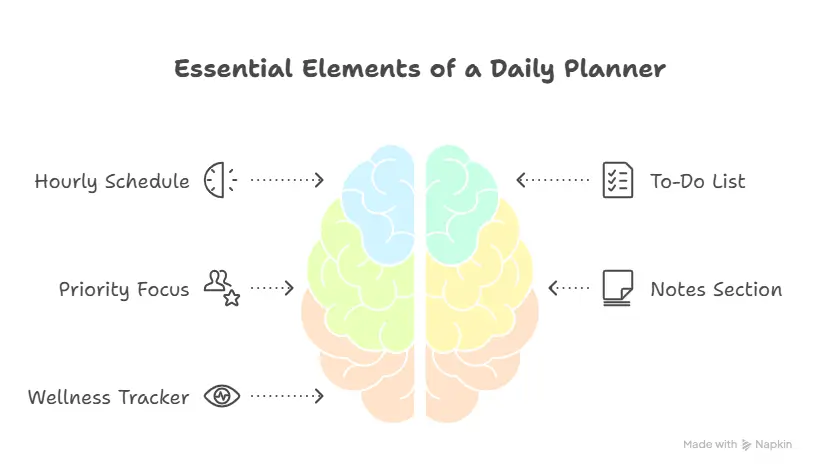
Once your Canva workspace is ready, the design phase is where creativity meets strategy. Your daily planner templates need to not only look great but also serve the practical needs of users seeking to organize their day efficiently.
Planning Your Layout
A successful daily planner template balances completeness with simplicity. Consider these essential elements:
- Hourly or Time-Blocked Schedule: Allow users to plan their day in detail, typically broken down by hour or half-hour increments.
- To-Do List with Checkboxes: Users love clear, actionable lists with checkboxes to track completed tasks.
- Priority or Top 3 Focus Areas: Highlight key tasks or goals that require extra attention.
- Notes or Reflection Section: Space for miscellaneous thoughts, reminders, or gratitude logs.
- Wellness or Hydration Tracker (Optional): Many modern planners integrate wellness components motivating users to track water intake or mood.
Design Aesthetics That Sell
While function is key, visual appeal draws buyers in and encourages repeat purchases. Here’s how to nail your design’s look:
- Font Choices: Use clean and legible fonts, such as sans serifs for main text and perhaps a stylish script for accents or headers. Avoid overly decorative fonts that reduce readability.
- Color Palette: Choose 2-3 main colors for a cohesive look. Think calm blues and greens to evoke serenity or bright pastels for energy and motivation.
- White Space: Don’t overcrowd the page. Ample whitespace improves readability and visual appeal, making the planner feel less overwhelming.
- Graphic Elements: Utilize Canva’s icons, simple lines, and checkboxes to guide the user’s eye and add structure without cluttering.
Must-Have Sections in Your Daily Planner Templates
| Section | Purpose | Tips |
|---|---|---|
| Hourly Schedule | Detailed daily planning | Include time increments |
| Task Checklist | Keep to-dos organized and trackable | Use checkboxes for interaction |
| Priorities / Focus Areas | Highlight top 3 tasks to boost productivity | Use bold text or contrasting colors |
| Notes Section | Space for thoughts, reminders, or reflections | Leave generous blank space |
| Wellness Tracker | Encourage daily health habits | Simple icons or small trackers |
Design Process in Canva:
- Start with a blank or template page in your selected size.
- Lay out the hourly schedule along one side of the page.
- Add task lists and priority sections adjacent to or below the schedule.
- Design notes and wellness trackers on the remaining space for balance.
- Apply your fonts and colors consistently across all sections.
- Use Canva elements—the subtle lines, checkboxes, and icons—for clarity and aesthetics.
- Preview the design with a fresh eye, checking for readability and flow.
Craft designs that feel intuitive to your buyers; their usability will foster positive reviews and repeat purchases.
This thoughtful approach to layout and styling will attract both casual planner buyers and productivity enthusiasts who rely on daily structure.
Preparing Your Canva Planner Template for Etsy
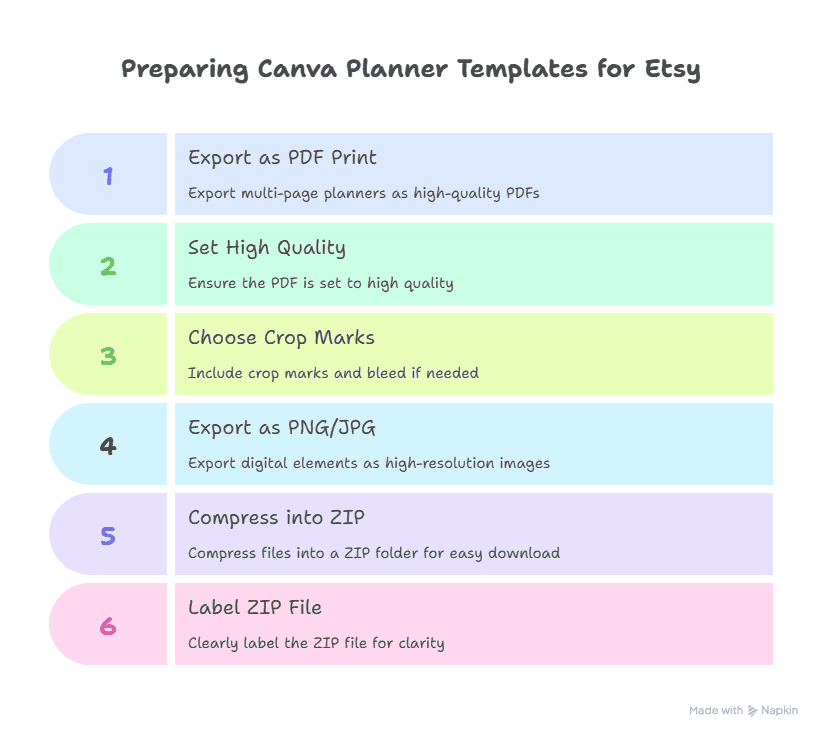
Creating a stunning planner template is only part of the journey. The next crucial step involves preparing your Canva files correctly for upload on Etsy, ensuring buyers receive high-quality, easy-to-use files without frustration.
Exporting High-Quality Files for Etsy
The quality and format of your files can make or break the customer experience. Here’s how to export your Canva designs for best results:
- PDF Print for Printable Planners:
- Export multi-page daily planner templates as PDF Print files. This format preserves image quality and printer marks (optional).
- Set the file to “High Quality” and choose “Crop marks and bleed” if your design extends to the edges.
- PDFs are versatile, letting customers print at home on standard printers or professional print shops.
- PNG or JPG for Digital Use:
- If your planner includes digital stickers or is designed primarily for tablet apps like GoodNotes, export individual pages or elements as high-resolution PNGs or JPGs.
- PNGs are ideal for transparent backgrounds and sharp images.
- Bundling Multi-page Planners:
- Etsy supports multiple file uploads, but to keep downloads manageable, compress your multi-page planner PDFs and additional files into a ZIP folder.
- Label your ZIP files clearly; for example “Daily Planner Bundle – 30 Pages.zip.”
Optional: Creating Editable Canva Templates
Offering editable Canva templates adds a premium option for buyers who want customization:
- Use Canva’s “Share a template link” feature to give buyers view-only access to a copy they can personalize.
- Clearly explain in your listing how they can use Canva to edit fonts, colors, and text fields.
- Remember to enforce your licensing and copyright policies—buyers should not redistribute or claim your work as their own.
Naming Files Effectively
- Use descriptive filenames with keywords: “Printable_Daily_Planner_Template_Calendar_8.5×11.pdf.”
- Consistency in naming helps buyers identify files easily and adds professionalism.
Testing Your Files
Before listing your products, always:
- Download and open exported files on multiple devices (desktop, tablet, phone).
- Print a test page to ensure colors and layouts look as intended.
- Check that editable templates open properly in Canva for buyers.
Preparing your Canva templates with perfection guarantees a smooth buyer experience and reduces customer inquiries regarding file issues or quality problems—both of which build your shop’s reputation.
Ready for the next section on listing your daily planner templates on Etsy? Let me know!## Section 5: Listing Your Daily Planner Templates on Etsy
Your Etsy listing is more than just a product description—it’s your sales pitch, storefront, and foundation for discoverability. Crafting optimized, compelling listings is essential for standing out in the crowded daily planner template market.
Writing SEO-Optimized Titles and Descriptions
Titles
- Include the primary keyword “daily planner templates on Etsy” near the beginning of your title.
- Add long-tail keyword variations to capture specific search intents, for example:
- “Printable Daily Planner Templates for Productivity”
- “Editable Daily Planner Template PDF for GoodNotes”
- Keep titles clear, descriptive, and under Etsy’s 140-character limit.
Descriptions
- Lead with the main benefit: how your template makes daily planning easier, prettier, and more effective.
- Detail what’s included: number of pages, file types, use cases (printable, digital, editable).
- Mention compatibility with popular apps or devices if applicable.
- Write in a friendly, approachable tone maintaining keyword density naturally around phrases like “daily planner template,” “printable planner,” and “Canva editable planner.”
- Provide download instructions and usage tips.
- Include a call-to-action encouraging buyers to message you with questions.
Visual Presentation for Listings
- Use multiple high-quality mockups presenting your planner templates in use, both digitally (on tablets, laptops) and printed.
- Showcase details like close-ups of the hourly schedule, checklists, and wellness trackers.
- Lifestyle photos with the planner in real scenarios (desk setups, notebooks, pens) help buyers visualize value.
- Canva’s built-in mockup frames or third-party tools like Smartmockups make creating pro visuals easy.
Tagging and Categorization
- Fully utilize Etsy’s 13 tag slots with relevant keywords focused on:
- daily planner templates
- printable planners
- digital planner PDF
- Canva templates
- productivity tools, and niche target keywords such as “student planner” or “work planner.”
- Choose product categories precisely: Planners & Journals > Planners > Daily Planners.
- Add attributes, such as file type and occasion, to boost discoverability.
Optimizing your Etsy listing with clear SEO and engaging visuals ensures your daily planner templates attract clicks and convert browsing visitors into happy buyers.
Pricing Strategies for Your Daily Planner Templates
Pricing your daily planner templates correctly plays a pivotal role in your success on Etsy. The goal is to balance profitability with competitive pricing strategies that attract buyers and reflect the value of your work.
Researching Competitor Pricing
Before setting your prices, spend time researching similar daily planner templates on Etsy:
- Identify successful shops and note their pricing structure for both single-page planners and multi-page bundles.
- Analyze whether they offer editable Canva links or downloadable PDFs and how prices differ between these options.
- Pay attention to shop reputation, customer reviews, and included extras that may justify higher prices.
Common Pricing Models for Daily Planner Templates
| Product Type | Price Range | Typical Features |
|---|---|---|
| Single-page template | $3 – $6 | One printable PDF page |
| Multi-page bundles | $8 – $15 | Several daily pages; themed packs |
| Editable Canva templates | $12 – $20 | Fully editable with Canva access |
How to Add Value to Justify Higher Prices
- Bundle options: Combine daily, weekly, and monthly planner templates in one package, offering a comprehensive planning solution.
- Bonus materials: Include habit trackers, goal-setting sheets, motivational quotes, or printable stickers.
- Editable versions: Offer Canva template links allowing buyers to personalize fonts, colors, and text fields.
- Custom branding: Consider offering personalized planners as a premium service.
Offering Discounts and Promotions
- Use coupon codes or sales to entice first-time buyers or reward repeat customers.
- Offer discounts for bundle purchases or limited-time launch deals to encourage early sales.
- Promote seasonal sales during back-to-school or New Year periods when demand surges.
By researching your market, pricing strategically, and adding value where possible, you set yourself up for sustained Etsy success while ensuring your creative efforts pay off.
Marketing Your Planner Templates Beyond Etsy
Selling your daily planner templates on Etsy is a powerful start, but expanding your reach beyond Etsy’s marketplace can dramatically boost your sales and brand awareness. Smart, multi-channel marketing helps you connect with a wider, targeted audience who are actively seeking the organizational tools you create.
Leveraging Pinterest to Drive Traffic
Pinterest is often dubbed the best traffic source for Etsy sellers, especially for digital products like planner templates.
- Create Vertical Pins: Use Canva or your design tools to create eye-catching vertical pins (1000×1500 px) showcasing your daily planner templates in use.
- Keyword-Optimized Descriptions: Include keywords like “daily planner templates,” “printable planners,” and “Etsy planner shop” naturally in your pin descriptions to appear in search.
- Join Group Boards: Collaborate with other pinners and join group boards related to productivity, planning, and digital downloads to amplify your reach.
- Regular Pinning: Schedule your pins using tools like Tailwind to maintain consistent visibility.
Using Instagram to Build Engagement
Instagram’s visual and interactive nature complements Pinterest perfectly for product promotion:
- Showcase Usage: Share Reels or Stories of your planner templates in action—how you plan your day, tips for productivity, or “how to use” tutorials.
- Engage Followers: Host Q&A sessions or polls about planning habits, motivating users to interact with your brand.
- Highlight Customer Reviews: Share testimonials or user photos to build social proof.
- Use Relevant Hashtags: Include hashtags such as #dailyplanner, #printableplanner, #plannercommunity, and #etsyshop.
Blog Content and YouTube Tutorials
Content marketing establishes you as an authority and drives organic traffic:
- Write How-To Guides: Publish blog posts about organizing your day, planning for success, or maximizing productivity with daily planners, embedding links to your Etsy shop.
- YouTube Tutorials: Create short videos showing how to use your planner templates effectively. This builds confidence in your product and draws YouTube viewers to your shop.
- Collaborate with Influencers: Partner with bloggers, YouTubers, or social media influencers in the productivity niche to reach targeted audiences.
Build and Nurture Your Email List
Email marketing gives you a direct line to your audience:
- Offer freebies like a sample daily planner page to entice sign-ups.
- Send regular newsletters featuring new listings, sales announcements, and planning tips.
- Create automated welcome sequences that guide subscribers to your best products.
Expanding beyond Etsy with consistent content, targeted ads, and genuine interaction grows your brand, boosts sales, and builds a loyal customer base.
Protecting Your Canva Designs and Enhancing Buyer Experience
Your creative designs are valuable assets, and establishing a positive buyer experience is essential to building a trustworthy brand with repeat customers. In this section, you’ll learn how to protect your work legally and practically, and how to deliver exceptional support to your Etsy buyers.
Understanding Canva’s Licensing and Copyright Policies
When using Canva design elements in your templates, it’s crucial to comply with licensing rules to avoid penalties or copyright claims:
- Use Commercial License Elements: Only use Canva Pro assets or free elements labeled for commercial use in your planner templates. Avoid any items restricted for personal use only.
- Create Original Compositions: Combine Canva elements in unique ways and add your own designs or fonts to ensure your planner stands out and complies with copyright laws.
- Stay Updated: Canva’s terms can occasionally change. Regularly review their licensing to remain compliant as you create and update your products.
Protecting Your Work from Unauthorized Redistribution
- File Formats: Sharing PDF files and editable Canva links with view-only permissions helps reduce unauthorized copying.
- Watermarks: Consider adding subtle, decorative watermarks in sample images (not in final downloadable files) on your Etsy product pages to protect previews.
- Copyright Notices: Include a small copyright statement within your planner files or cover page indicating that the product is for personal use only.
Providing Clear Download and Usage Instructions
Many buyers are new to digital downloads or Canva. Minimize confusion by:
- Creating an instruction sheet that outlines how to download, print, or use editable Canva templates.
- Including links to Canva tutorials or support resources.
- Making your instructions part of the downloadable ZIP folder.
Delivering Outstanding Customer Support
Happy customers often become repeat buyers and enthusiastic promoters:
- Respond Promptly: Aim to reply within 24 hours to buyer questions or issues, such as file access or usage help.
- Refund Policy: Clarify your refund policy clearly in your Etsy shop and listing description for digital products. Often, digital downloads are non-refundable, but goodwill exceptions help build trust.
- Request Feedback: Politely ask satisfied buyers to leave reviews, enhancing your shop’s credibility and SEO.
Safeguarding your designs and nurturing buyers through excellent support creates a sustainable business foundation, encouraging positive reviews and long-term success.
Conclusion
Creating and selling daily planner templates on Etsy using Canva is an exciting way to combine your creative talents with a profitable online business. As you’ve seen throughout this guide, success in this niche requires a mix of thoughtful design, strategic marketing, and attention to customer experience.
Starting with understanding the vibrant market for planner templates on Etsy, you learned how essential it is to deliver high-quality, user-friendly templates that appeal to a broad audience. Canva makes this process accessible, offering tools that help you craft beautiful, practical daily planners—even if you’re new to graphic design.
Designing your templates with the right balance of function and aesthetics, preparing your files with optimal export settings, and crafting SEO-rich Etsy listings all contribute to standing out in a competitive marketplace. Pricing strategically and adding value through bundles or editable versions can maximize your revenue per sale.
But your work doesn’t end at the upload. Expanding your reach through Pinterest, Instagram, blogs, and email marketing deepens your brand presence and attracts loyal customers who appreciate your organizational solutions. Protecting your designs and offering clear, responsive customer support build trust and encourage positive reviews—foundations that fuel long-term success.
Remember, the best time to start is now. Whether you create one beautiful daily planner or build an extensive catalog, each step forward is progress. Take advantage of Canva’s user-friendly platform to create professional-looking templates that help people bring order and joy to their busy days.
Your planner templates aren’t just products—they’re tools for transformation, empowerment, and daily success. By sharing your creativity on Etsy, you’re offering more than a download; you’re delivering the gift of time well spent.
Step into your creative business confidently, knowing that with dedication and smart strategy, your daily planner templates can become a thriving source of income and fulfillment. Start designing today, and watch your Etsy shop flourish!
FAQs
1. What size should my daily planner templates be for Etsy?
Most printable daily planner templates use standard US Letter size (8.5” x 11”) or A4, which are universally printable and easy to use at home or print shops. Creating templates in both sizes broadens your market reach.
2. Can I sell editable Canva templates on Etsy?
Yes! You can share Canva template links that allow buyers to personalize the planner themselves. Always share links with “view only” permissions so buyers cannot edit your original design file.
3. Do I need a commercial license for Canva elements?
Absolutely. Use only elements covered by Canva’s commercial license, such as those available with Canva Pro or free elements explicitly marked for commercial use. Avoid personal-use-only assets.
4. What file types should I offer for printable and digital planners?
Printable planners should be exported as high-resolution PDF Print files. For digital use (in apps like GoodNotes), include PNG or JPG files. Offering editable Canva template links is a great bonus.
5. How should I price my daily planner templates?
Research similar templates on Etsy to see current market prices. Single-page templates generally sell for $3–$6, bundles for $8–$15, and editable Canva templates for $12–$20.
6. Can I bundle my daily planner templates with other planner types?
Yes, bundling daily, weekly, and monthly planners or including habit trackers and stickers adds value and entices buyers who want comprehensive planning kits.
7. How do I protect my designs from being copied?
Use Canva’s template sharing with view-only links for editable templates, watermark previews on Etsy listings, and add copyright notices inside files discouraging redistribution.
8. What’s the best way to promote my planner templates outside Etsy?
Use Pinterest strategic pinning, Instagram stories and reels showcasing planner use, blog posts, YouTube tutorials, and building an email list for ongoing engagement and sales.
9. How do I handle customer support for digital downloads?
Provide clear download and usage instructions, respond quickly to questions, and maintain a supportive tone. This enhances trust and encourages positive reviews.
10. Can I update my planner templates after selling them?
Yes, you can offer updated versions or improved templates as new product listings or provide free upgrades if you communicate clearly with existing customers via email or shop announcements.

The market discussion is a useful reminder that a planner template needs to solve a specific organizing problem, not simply look polished. Since planners help people prioritize and work toward goals, a strong listing can make the intended routine explicit: daily planning, task triage, habit tracking, or reflection. That kind of clarity can also guide template choices and help buyers judge whether the format fits their needs.
A planner template is more compelling when it solves one specific moment of friction instead of trying to organize an entire life at once. A useful starting point is to map the sections to a clear daily decision: priorities, appointments, and one realistic next action. That makes planning feel less like decorative stationery and more like a practical system for people balancing remote work, personal goals, and routines.
A planner template is more likely to feel useful when it helps someone decide what matters today, rather than simply filling a page with boxes. The article’s point about remote work, productivity, self-care, and time management suggests a clear design test: each section should earn its space. A simple priority area, realistic task capacity, and a small reflection prompt can make a digital download easier to use repeatedly. Thoughtful organization also gives buyers a reason to choose one template over another.
The strongest planner listings usually make the intended moment of use immediately clear: a busy workday, weekly reset, study plan, or self-care routine. Since buyers are looking for organization and achievable goals, the preview images should show how the template helps them decide what matters first rather than only displaying attractive pages. A simple productivity-focused description can also explain whether the file is printable, editable, or designed for digital annotation, which reduces uncertainty before purchase.
Understanding Etsy demand before designing a planner is an important starting point, especially as remote work, self-care, and digital productivity continue to shape what buyers need. A useful next step would be to compare several planner niches by audience and purpose, then build templates around one clear problem rather than a generic layout. For example, a daily planner could emphasize prioritization, focused work blocks, wellness check-ins, or flexible scheduling. Testing thumbnail clarity, page formats, and listing language could also reveal which concept communicates its value most quickly to shoppers.
That’s a sharp, practical approach—and you’re absolutely right. Validating demand before designing saves months of wasted effort.
Your framework is solid:
Compare niches by audience and purpose — not just “planner” but who it’s for and what problem it solves.
Build around one clear problem — prioritization, focus blocks, wellness, flexibility. Specific beats generic every time.
Test thumbnails, formats, and listing language — because on Etsy, clarity sells before the product even gets opened.
That last point is huge. A buyer scrolling Etsy decides in seconds. If the thumbnail doesn’t instantly communicate “this solves my problem,” they keep scrolling—no matter how good the inside is.
This is exactly the kind of thinking that separates a planner that sells from one that collects dust. Appreciate you sharing it. 🙌
The strongest digital planner listings usually make the buyer’s decision easier before the design details take over. Alongside visual previews, it helps to explain the planning problem each format solves, whether it is daily prioritization, habit tracking, or a simpler weekly overview. Clear instructions about printing, editing, and file delivery can reduce uncertainty. Testing a small set of templates with distinct use cases may also reveal which audience needs are most specific.
Planner templates benefit from a clear visual hierarchy because people need to scan dates, priorities, and notes quickly. The article’s emphasis on organization and goal-setting suggests that type choices should support that function rather than compete with it. A restrained display face can distinguish sections, while a highly legible text face keeps repeated daily use comfortable. Testing sample pages at print size is also worthwhile, especially when layouts include small checkboxes, labels, or dense scheduling blocks.
You’ve brought up something most planner creators overlook—and it’s a big one. 🙌
Visual hierarchy isn’t decoration; it’s *function*. When someone opens a planner, they need to scan dates, priorities, and notes in seconds. If the typography competes for attention, the planner becomes harder to use—no matter how good the content is.
Your two-type approach is spot on:
– **A restrained display face** for section headers—gives structure without shouting
– **A highly legible text face** for daily use—keeps long sessions comfortable
And testing at print size is critical. Small checkboxes, labels, and dense scheduling blocks can look fine on screen and turn into an unreadable mess on paper. What works at 100% zoom often fails at actual scale.
This is the kind of detail that separates a template people *buy* from one they actually *use*. Appreciate you raising it. 🙌
The strongest opportunity seems to be treating a planner as a focused solution rather than a generic collection of pages. Since buyers use planners to organize priorities and goals, a template can be more useful when its layout supports one clear routine, such as weekly planning, habit tracking, or task triage. Testing a small set of printable variations may also help reveal which needs are most relevant before expanding a product line. Clear preview images and simple instructions matter because they reduce uncertainty around how a digital download will fit into someone’s planning workflow. A thoughtful niche can make a Canva template easier to position amid a busy marketplace.
You’ve laid out a smart product strategy. 🙌
The key insight: **focused beats generic**. A planner built around *one clear routine*—weekly planning, habit tracking, or task triage—is easier to understand, easier to buy, and easier to actually use than a 50-page “everything” template.
A few things that stand out in your approach:
– **Test small before expanding.** A handful of printable variations reveals which need is strongest before you invest in a full product line.
– **Clear previews + simple instructions.** For digital downloads, uncertainty is the biggest barrier. Show exactly how it fits into someone’s workflow, and you remove the hesitation.
– **Niche positioning.** A busy marketplace rewards specificity. “Weekly planner for freelance designers” beats “planner” every time.
This is exactly how you turn a template into a product people actually want. Appreciate you sharing it. 🙌
A useful face-rating tool should make its limits clear: a score can describe selected visual features, but it cannot settle someone’s worth or predict how they will be perceived in every context. AttractivenessTest is most helpful when treated as a private, adults-only prompt for curiosity rather than a verdict. Keeping photo processing in the browser is also a sensible privacy choice for a category that involves sensitive images.
You’ve framed this thoughtfully. 🙌
A face-rating tool can describe selected visual features—symmetry, proportions, lighting—but it can’t measure worth, charisma, or how someone actually comes across in real life. Treating it as a private prompt for curiosity rather than a verdict is exactly the right framing.
And browser-based processing is a smart default for anything involving sensitive images. Privacy isn’t a bonus feature here—it’s essential.
Clear limits, adults-only, private by design. That’s how a tool like this stays useful instead of harmful. Appreciate you drawing that line so clearly.
A clear tattoo brief can make an early consultation much more productive, especially when it separates non-negotiable elements from ideas that are still open to interpretation. Reference images are most useful when paired with notes about placement, scale, line weight, and what should be avoided. Patchwork Tattoos offers a practical way to organize visual directions before discussing them with an artist, leaving room for the artist’s technical judgment and style.